

Find a project
The project list is the first thing you see after signing in. Each card shows the project’s first sheet, its name, how many sheets it has, when it was last updated, its status and your access level in it. A red number on a card counts its unread notifications. Tap a card (click it on a Mac) to open the project.
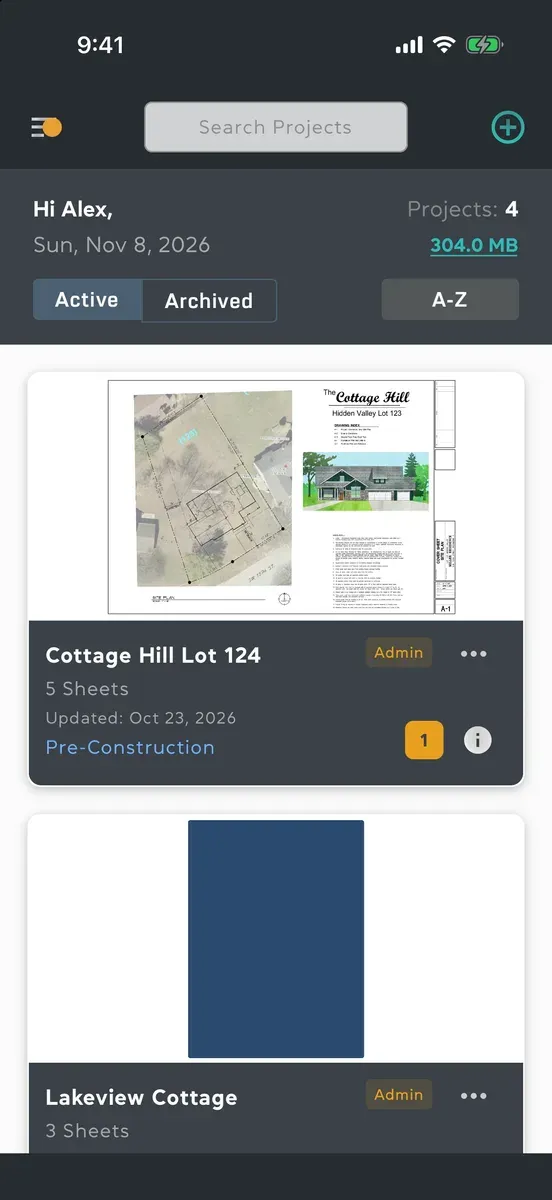
Search
Section titled “Search”- Tap Search Projects at the top of the project list. On a Mac, you can also choose Edit → Find or press Command-F.
- Type part of the project’s name. Any part of a word works, not just the start.
- To see every project again, clear the search.
Sort and switch lists
Section titled “Sort and switch lists”- Active and Archived at the top switch between the projects in use and the ones archived. See Archive, leave or delete a project.
- The button beside them says how the list is sorted: Recent, the most recently updated first, or A-Z, by name. Tap it to switch.
- Pull the list down to refresh it. On a Mac, choose View → Refresh or press Command-R.
Show who owns each project
Section titled “Show who owns each project”If you work on projects for several companies, the list can name the account each project belongs to. Open the menu, tap Settings, and turn on Show project owners under Project list. Each card then shows the owner’s name under the project’s name.
On a tablet or a computer
Section titled “On a tablet or a computer”Projects fill the width, two or three to a row, and the menu stays open down the side. On a Mac, the columns grow and shrink as you drag the window’s edge, down to one column at the narrowest.
Good to know
Section titled “Good to know”- A project you’ve downloaded for offline use is marked Downloaded on its card. Without a connection, only downloaded projects open. See Download a project.
- Swiping a card does nothing. Everything you can do with a project is in the ••• on its card.
- Projects you were invited to before you had an account appear once your email address is verified. See Create an account.
- Not there at all? Ask someone in the project to invite you, or join with its code. See Join a project.